DNS Record Types Explained

What is DNS?
DNS stands for Domain Name System, at a very high level it can be understood as a decoder. Whenever we enter some string of characters as a URL in the browser. The browser uses DNS to decode that string to an IP through multiple steps such as querying the root server, TLD server, authoritative server. Now this is discussed in more depth in another article of the same blog you could refer to it to know more in where we only answered one question “How does a browser know where a website lives?”.But right now you just need to know that in the end we reach the authoritative server and we are gonna discuss the conversation of the DNS resolver and authoritative server.
Why DNS Records are needed?
The authoritative server and DNS resolver are gonna have to communicate through a medium and as they are servers they don’t understand human-readable instructions. Therefore we use DNS Records, each record conveys a message from the authoritative server to the DNS resolver. Now that we understand that communication occurs through records between them, we would have to know that DNS would always ask the server for the particular record type. To which the server can reply in many different ways. For that there are many types of records with some pre-defined purpose with placeholders to fill, let’s start to go through each one:
A Record
A Record is the simplest record which basically corresponds to the IP address of the server on which the requested domain is hosted. Here the A stands for “Address”. One thing to remember would be that A Record only return an IPv4 address (Will come in handy later!). It holds 2 things, the value and TTL. Where the value field is where the IP is stored. TTL stands for “Time to Live” and is default at 14400 seconds for an A record, which means resolvers may continue serving old IP for up to 14400 seconds even after an update.
| example.com | record type: | value: | TTL |
|---|---|---|---|
| @ | A | 192.0.2.1 | 14400 |
CNAME Record
The CNAME Record works just like an alias. Here CNAME stands for “Canonical Name”. It stores another domain to which the DNS Resolver would be sent to get the IP address of the server. The thing to note here is a CNAME record can only point to another domain not an IP address. It also holds 2 thing, the value and TTL. The value here would just hold a domain.
Note: A CNAME record can point to another CNAME record which is generally inefficient and it also affects the user experience negatively.
| example.com | record type: | value: | TTL |
|---|---|---|---|
| @ | CNAME | is an alias of example.in | 32600 |
AAAA Record
AAAA Records are just like the A records but with the caveat that they return IPv6 addresses instead of IPv4 addresses. But AAAA records are only used when the hosted domain has an IPv6 address. This shift is happening as IPv4 records are rapidly diminishing as the internet is exponentially growing therefore the use of IPv6 is being adopted which gives much more combinations and permutations.
| example.com | record type: | value: | TTL |
|---|---|---|---|
| @ | AAAA | 2001:0db8:85a3:0000:0000:8a2e:0370:7334 | 14400 |
MX Record
MX stands for “Mail Exchange”. MX records directs the emails to a mail server, whenever we send an email the MTA(Message tranfer agents) sends a DNS query for the mail server of the receipent’s email. Then it establishes an SMTP connection with that server to send the message. It holds 3 things, the priority, the value and TTL. The priority indicates in which order would the mail servers would be queried if the ones before them fails. The lowest priority is queried first. The value holds the actual domain of the mail server.
Note: A MX record can only point to a domain which can be resolved to either an A Record or an AAAA Record.
| example.com | record type: | priority: | value: | TTL |
|---|---|---|---|---|
| @ | MX | 10 | mailhost1.example.com | 45000 |
| @ | MX | 20 | mailhost2.example.com | 45000 |
TXT Record
As many would have guessed TXT here stands for “text”. A TXT Record holds text (surprising!) in the form of a string with quotation marks. Which was initially created to store human-readable notes but now it is possible to put machine readable data into them. It holds 2 things, the value and TTL. Often the value is in "attribute=value" format, but it is not a mandate. Nowdays, it is mostly used for Domain ownership verification and email spam prevention.
| example.com | record type: | value: | TTL |
|---|---|---|---|
| @ | TXT | "Example Text." | 32600 |
NS Record
Now we come to the most interesting record, NS here stands for “nameserver”. NS records store the domain name of a DNS server where generally the IP is stored. A nameserver is a type of DNS server that stores all DNS records for a domain. These are there to increase reliability as if one nameserver goes down or is unavaialable it goes to second/secondary nameserver which stores exact copies of what the primary nameserver holds. It holds 2 things, the value and TTL, the domain name of the nameserver is stored in the value.
| example.com | record type: | value: | TTL |
|---|---|---|---|
| @ | NS | ns1.exampleserver.com | 21600 |
How they come together?
Let’s understand by the example of a website:
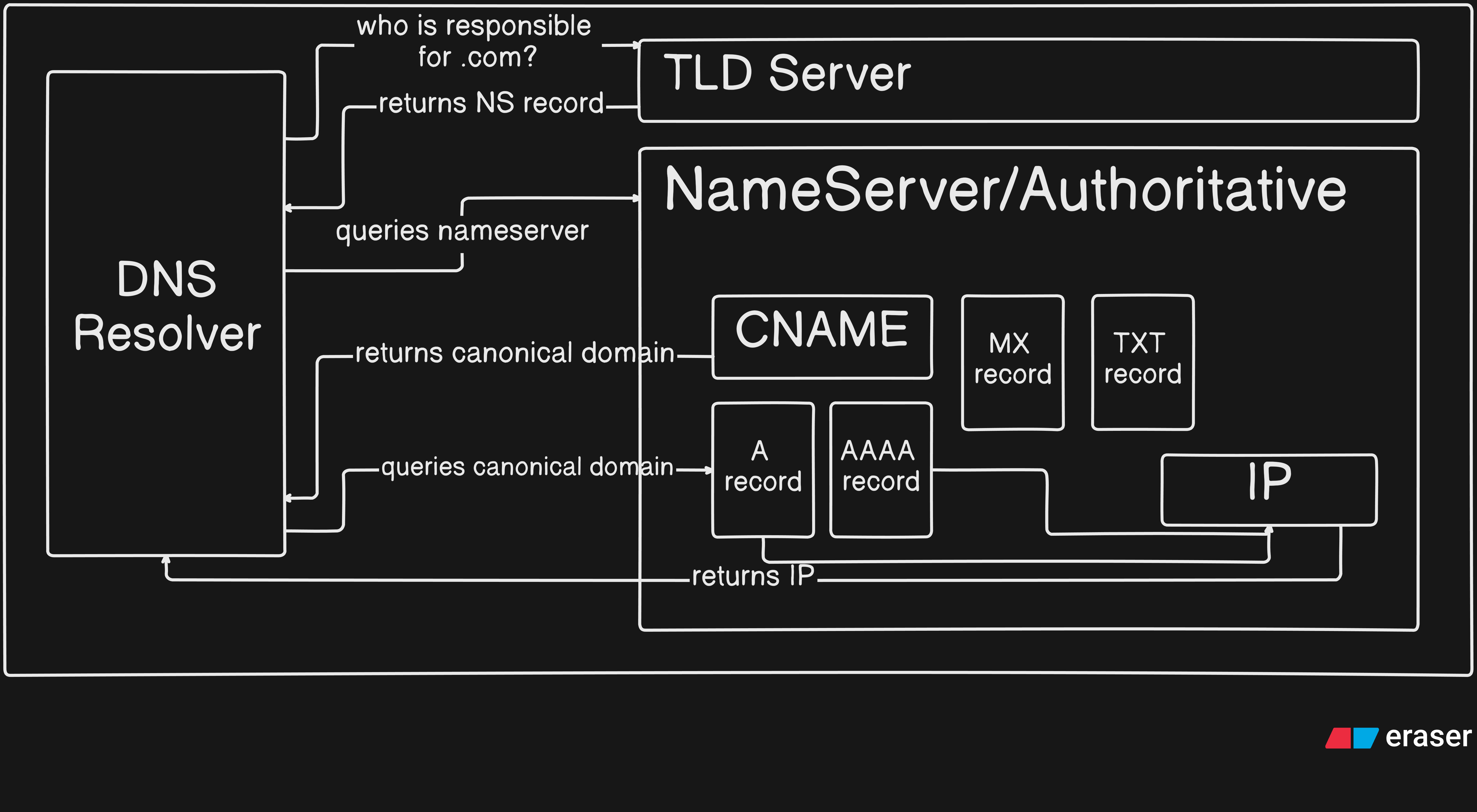
Now let’s understand what is happening (ommitting root servers for simplicity),
The DNS resolver first queries the TLD server to find the Authoritative DNS Server responsible for
example.com.The TLD server returns an NS record, which tells the resolver which nameserver manages the domain. The resolver then queries the nameserver mentioned in the value of that NS record.
When the resolver asks for the IP address of
www.example.com, the nameserver returns a CNAME record, indicating thatwww.example.comis an alias for another domain, for exampleexample.net.The DNS resolver then queries this canonical domain (
example.net). In response, the nameserver returns an A record, which contains the IP address of the server.Using this IP address, the browser is finally able to connect to the website.
Conclusion
Now we know the basic DNS records, how a DNS queries a website. What purpose does each DNS record have and when is it used. By understanding A, AAAA, CNAME, TXT, MX and NS records are used we gain a deeper understanding of how DNS works. Once this flow is understood the blackbox of DNS is unveiled and clarity is acheived.


