Understanding Network Devices
Why?
So before understanding what are networking devices, we first need to understand why — why are there network devices. This is slightly correlated to the history of computers and internet, let’s say there were individual computers at people’s home. Now naturally, when people are alone what do they want to do? They want to connect with more people, socialise.
When people thought of connecting computers, we didn’t have sophisticated devices which let data come from different devices and send to multiple devices. This was majorly done by just connecting computers through long wires which although worked, we know is not practical. To solve that some devices evolved which helped us simplify this procedure and we termed them as “Network Devices”
What and How?
Now that we understand the need of Network Devices, you may have gotten the idea of what are they but let us state it here.
Network Devices are the physical hardware required for data transfer or interaction between computers on a computer network.
A really nice analogy is to see it as the “plumbing” of the network, directing the load to where to go? and how much to go? With that let’s start studying the most widely used Network Device being used in the world as of now:-
Modem
You might have heard the term “Modem“ but let’s study the meaning behind it.
The word “Modem” is formed from 2 words “Modulator” & “Demodulator”. A Modem is used to connect connected devices to the internet/ISP(Internet Service Provider).
The working of Modem can be visualised as following:

At first glance many things are happening in the image and it may seem complicated or scary, but let’s break it down one by one:
Modulation: It is the process in which the data generated by computer which was in the form of a digital signal (referring that it only took values 0 or 1) is converted into analog data so that it can further travel onto the internet.
Transmission: Now the Modulated/analog data is then transmitted over the communication line which maybe telephone/fiber/cable lines to the modem that is receiving the data.
DeModulation: Now the analog data is received by the receiver Modem but computers only understand digital signal, thus the process of DeModulation occurs in which the data is converted from analog signal back to digital signal. And now the data is finally received by the secondary computer.
That is the whole working of a Modem, now there are different types of Modems such as Optical Modem, Digital Modem, Cable Modem, etc. which have there own pros and cons relating to speed, reliability and cost. But under the hood they all accomplish the above through various means.
This may seem simple but there is much more to Modems like the modulation techniques they use (64-QAM → 6 bits/signal, 256-QAM → 8 bits/signal), how they perform error detection & correction (CRC & FEC), Synchronization and much more, but let’s worry about that later and move on to our next device.
Router
So when we try to search up the definition of a Router, we get something like this:
A Router is a networking device that forwards data packets between different computer networks, managing traffic by directing packets to their intended IP addresses. Commonly between your LAN and WAN.
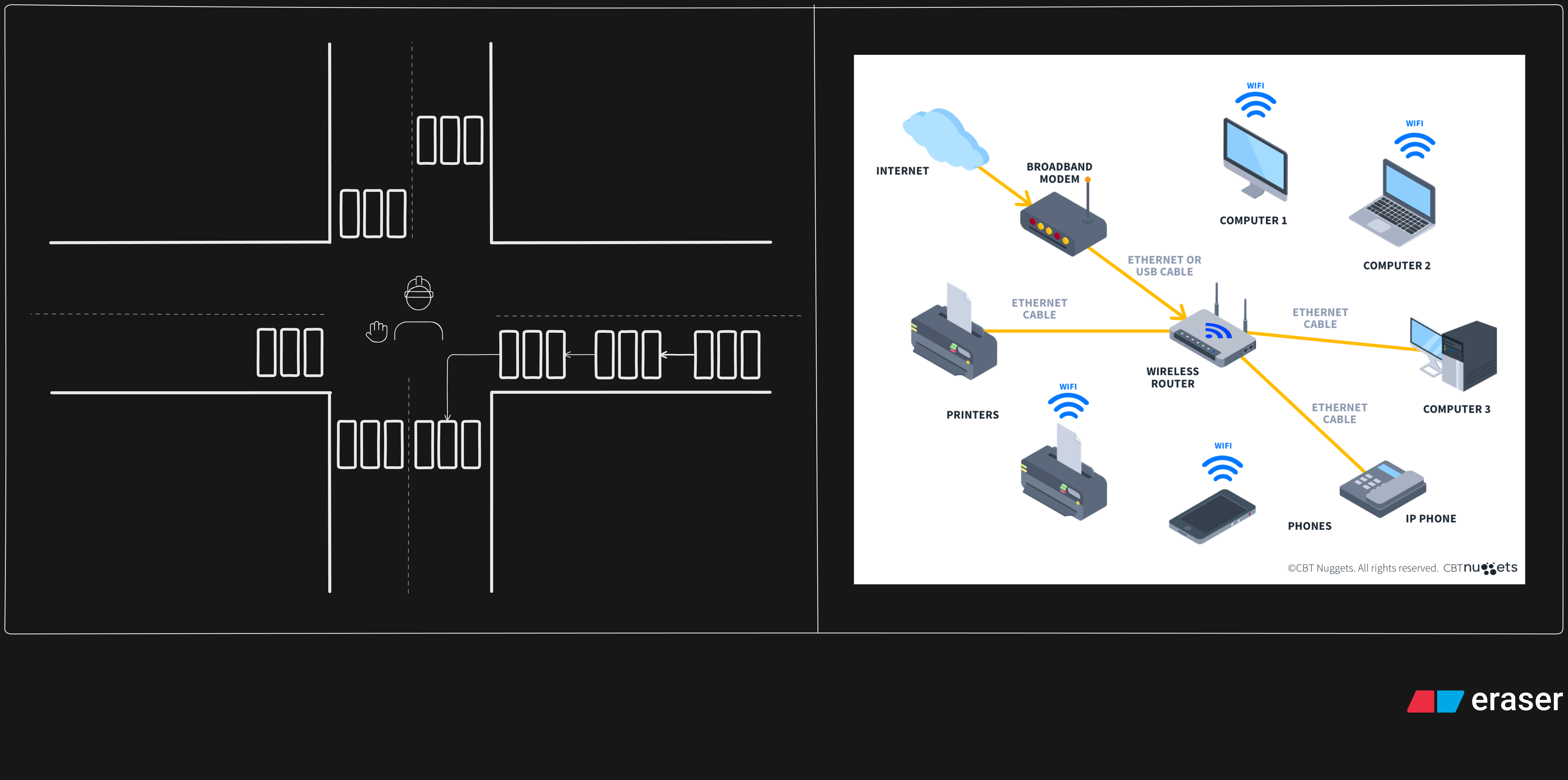
Sure! But in simple terms we can understand a Router through the following analogy:
[Source: Link]
A Router is like a traffic police personnel standing at a four way. The one who is controlling the flow of the traffic whilst also connecting different lanes and roads.
Similarly a Router helps forward/send the data packets to the correct location or as in networking terms to the intended IP address. That’s what a router does, It routes! This is generally done through routing tables and algorithms, of which majorly the following 2 strategies are used:
Static Routes : Static routes are basically fixed pathways between 2 address/ranges which are manually configured. They are mostly used for small and stable networks.
Dynamic Routes : Now as the name suggests they dynamically change the pathway depending on the criteria the protocol being used uses, some of which include OSPF, BGP, IGRP, etc. They are generally used for larger networks or constantly changing patterns.
Some more functions of Router include VPN Connectivity, Bandwidth Management, NAT, Monitoring & Diagnostics. There are much more internals such as the Router architecture with input/output ports and the switching fabric but let’s delve onto that later.
Switch & Hub
These are the most commonly confused and misunderstood of Networking Devices, So let’s study them together and properly differentiate them.
A network switch often connects devices within a network (generally LAN) and forwards data to and fro from those devices.
A switch is generally placed between a Router and the nodes (the devices connected to the LAN). Generally Switches operate at layer 2 or the data link layer of the OSI Model as it uses MAC addresses to function. Although some switches forward data based on the IP Address which is the layer 3 of the OSI Model.
They use switching to send, receive and forward data packets over the network. There are various methods of switching broadly classified into the following categories:
Circuit Switching : A dedicated path between sender and receiver before sending the data using the full network bandwidth. It guarantees a fixed data rate it is costly and inefficient for large networks.
Packet Switching : With this method of sending data in small units called packets, each containing a header and payload. Now packets travel through store and forward concept, which are in the end assembled at the destination. This makes it efficient and flexible.
Message Switching : In this the entire data unit is sent from node to node but without a dedicated path between the sender and receiver, it uses the store-and-forward concept. This allows data to be transmitted even when direct connections are not available.
Now let’s understand Hub and the most basic difference between the two.
A Hub is a multi-port device that is generally used to connect LANs. It works at the physical layer to connect multiple devices in the network.
So how is it different from a Switch?, Well first of all it works at the physical layer which is the layer 1 of the OSI Model. Secondly, a Hub can be thought of as a dumb Switch as it does allow to connect multiple devices and transfer data BUT it has no filter. If one node is sending data all rest of the nodes would receive that.
You might be thinking that then why do we consider this a networking device and not just an outdated piece of tech, well it does have some usecases. Such as packet sniffing / labs, frame flooding in broadcasting , multicast and unicast (although still could be done better using switch but that would lead to a higher cost) as well. Although it is inefficient and there is no filtering, it is less expensive and support different network media.
Now we understand how we connect to the internet and how data is transferred but sometimes we need to protect the data from being stolen as it may carry important information about users such as passwords, usernames, addresses, ips, etc. For that we move on to the next device.
Firewall
A Firewall is a network security system, that monitors and controls traffic based on a set of pre-defined rules. Generally placed between a trusted and an untrusted network.
A Firewall may be a software or a hardware but the function remains the same. That is it stands between an untrusted network (,generally the internet) and your device, as shown:-
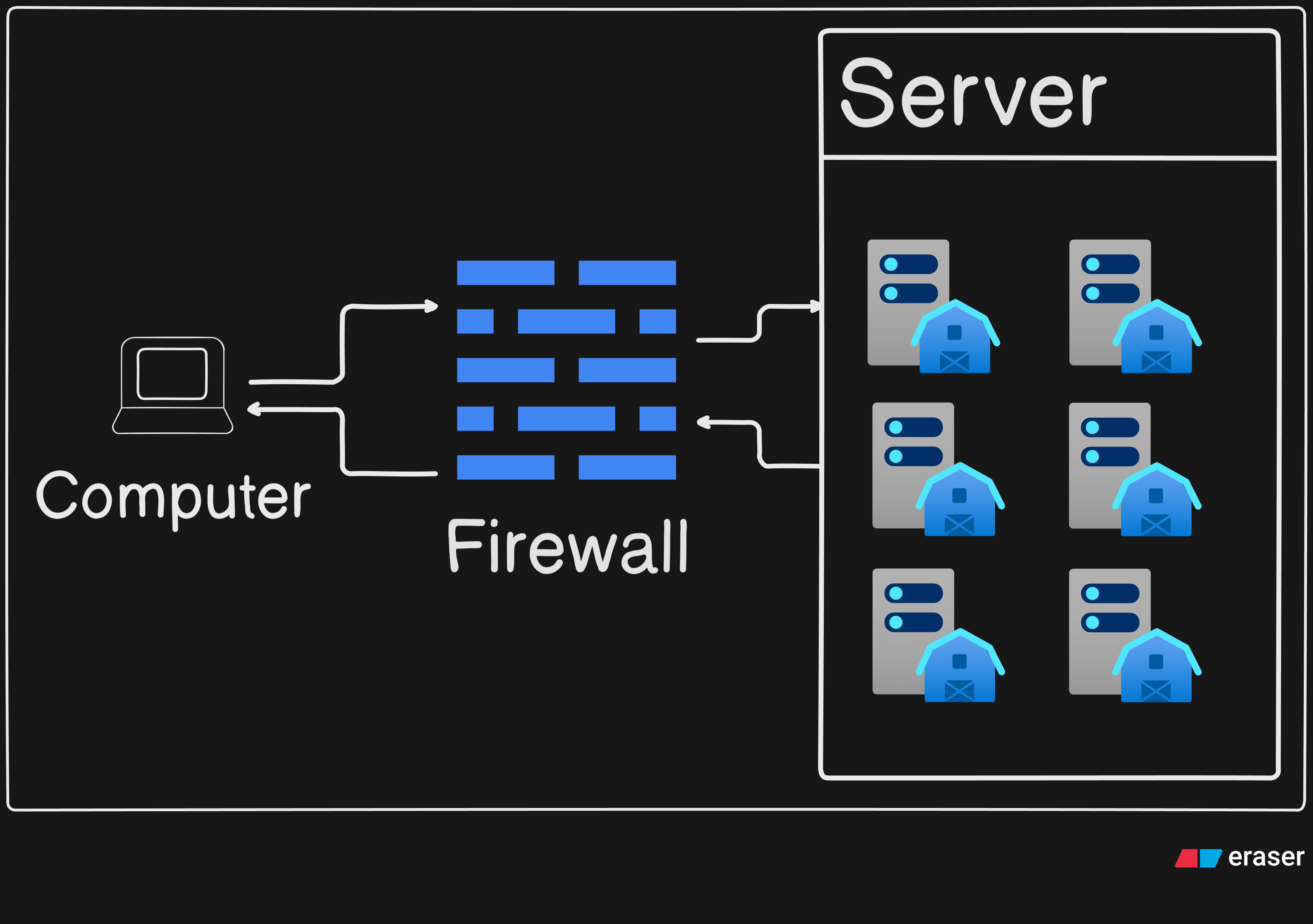
Then it categorizes each data packet broadly into 3 categories:
Allowed : If the data packet follows the pre-defined rules it lets the packet go through as it would have gone through normally.
Dropped : If the data packet contains something suspicious but the Firewall isn’t able to gaurrentee the risk, it drops the data packet and generally notifies the user.
Rejected : If the data packet breaches the rules severly then the data packets are generally directly rejected and the user may or may not be notified.
Now it is trivial that this is a very important part of today’s network with so many cyber attacks and malicious traffic. It also prevents unauthorised access and sensitive information. With more control on network traffic enabling features such as parental controls.
The major types of firewalls are proxy-based firewalls, stateful firewalls, next-generation firewalls (NGFW), and web application firewalls (WAF). Each has it’s own pros and cons designed for specific usecases.
Load Balancer
This maybe a new term but I assure you it is simple enough to understand, the definition goes as follows:
A load balancer is used in between the client and the server so that the load can be efficiently distributed among the servers.
A load balancer can be either a software application or a hardware device. It ensures that no single server is overwhelmed with all the requests. This helps improve the performance, reliability, and availability of applications. Load balancers are widely used in cloud computing, large-scale web applications, and more.
The working of a Load balancer can be understood as a procedural method:
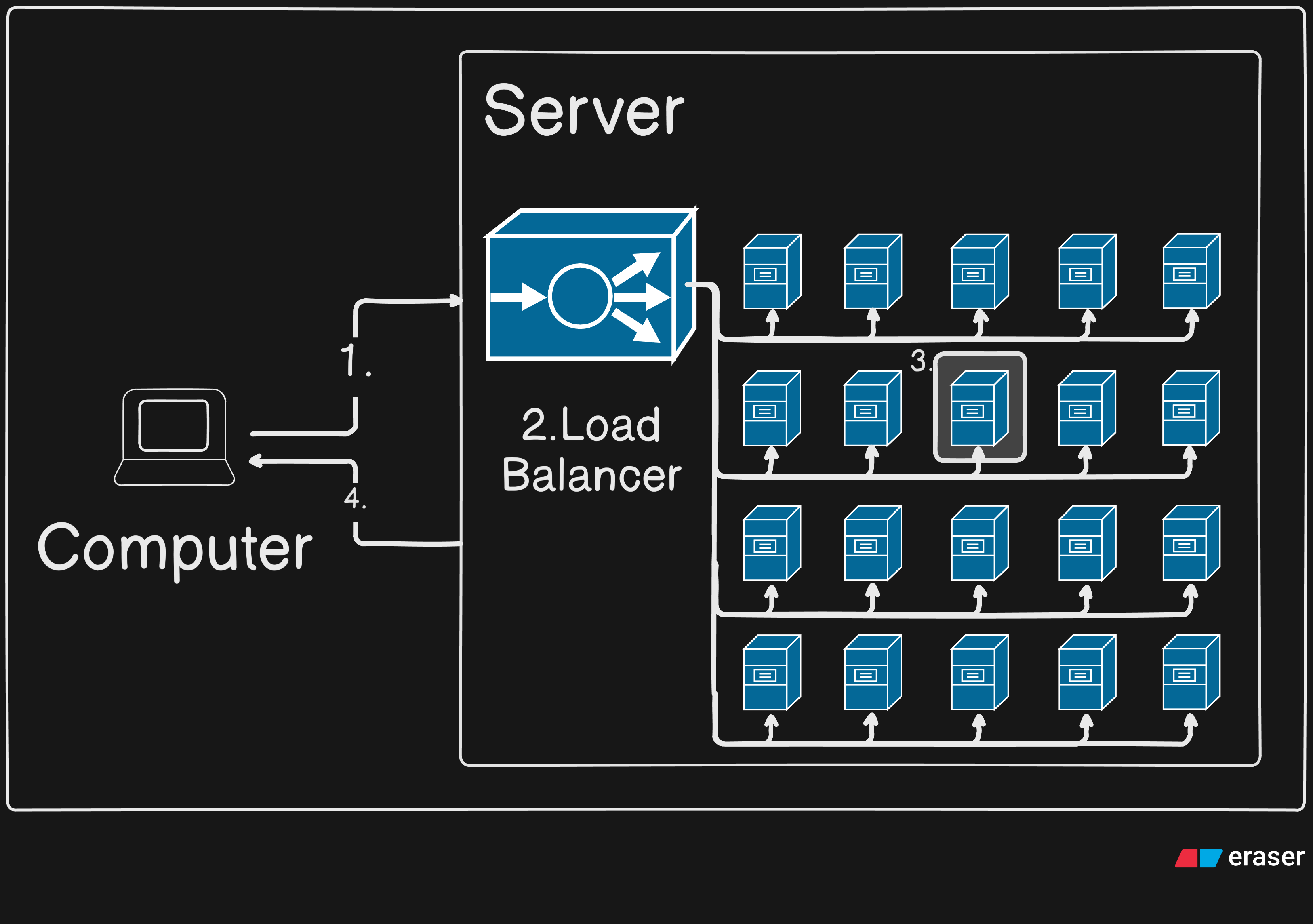
A client requests a website/server.
The Load balancer monitors the servers statistics.
According to some pre-defined algorithms within the Load balancer a server is assigned.
The request is forwarded to that particular server and it proceeds as normal.
Yes, that’s it. Although this is a very high level description of how a Load balancer works, It is just enough to also not overwhelm. Now let’s conclude the connection between all these devices.
Conclusion
Now we know about some basic Network devices, let’s see how the come together in real life. We start with a simple example, what happens when we enter https://google.com with the perspective of networking devices (not DNS routing). The following is a visual of how it would go (You could add Hub between Client and Switch) :-
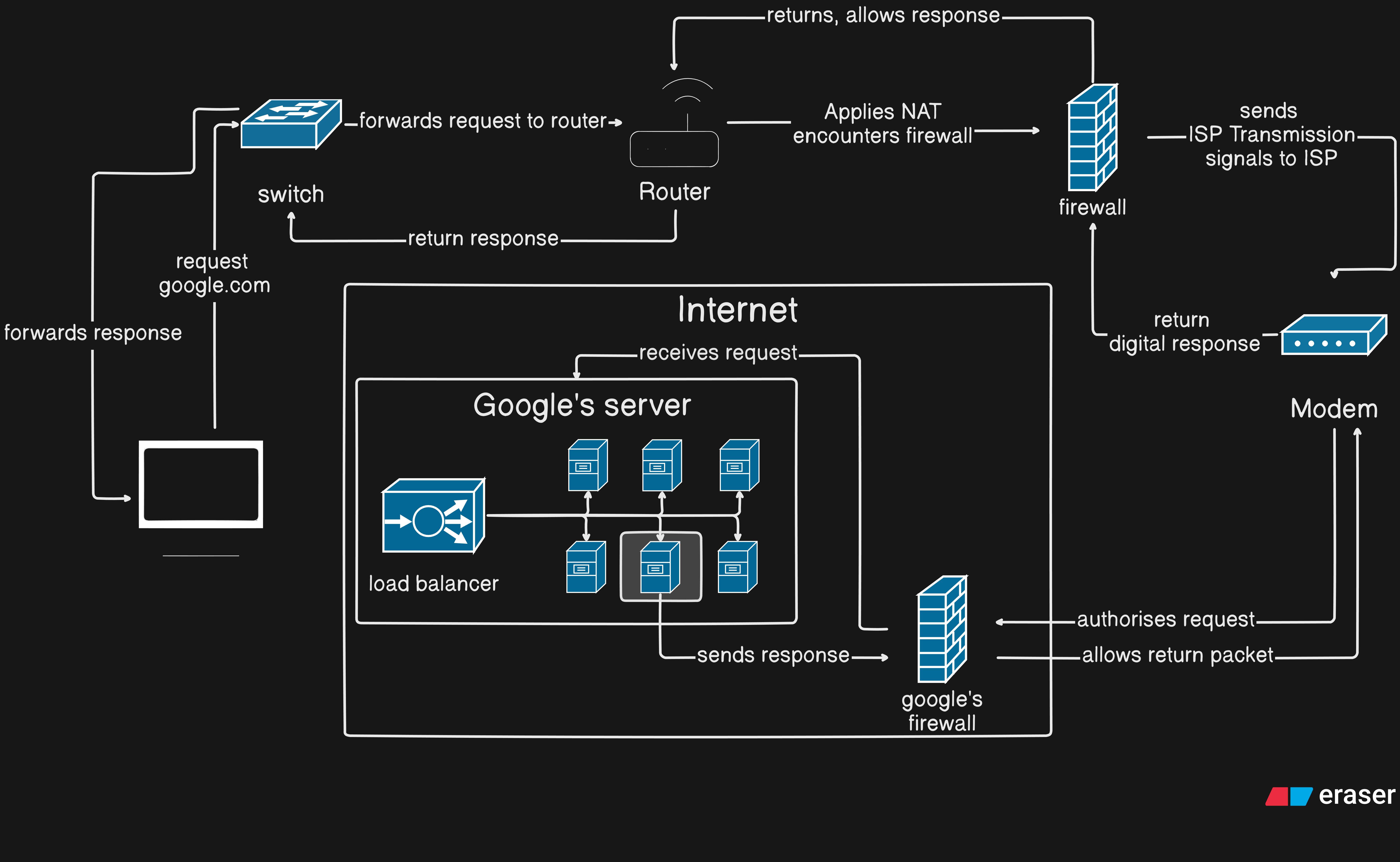
So that looks complex but if you go step by step, I think you would start to recall the purpose of each device and understand this whole. With this we conclude Network devices and now you would know, Why do we need Network Devices, What are some of them, How do they function. I would recommend trying to observe and understand network devices around you to deepen your understanding.
Thank You!


