Understanding Objects in JavaScript

In the previous articles we have discussed primitive data types, operators and arrays. Arrays allowed us to store multiple values inside a single variable. But arrays only imply an order to the values with indices, and nothing apart from that. In some cases we want to store multiple pieces of information but with keys that define the value. That is where Objects come in, they provide structure to the multiple values and in somecases define a blueprint for the same kind of values.
What are Objects and why do we need them?
Objects are one of the most commonly used structures in javascript. They store data in the form of key-value pairs, instead of accessing data through numbers like arrays, objects allow us to access data using meaningful names.
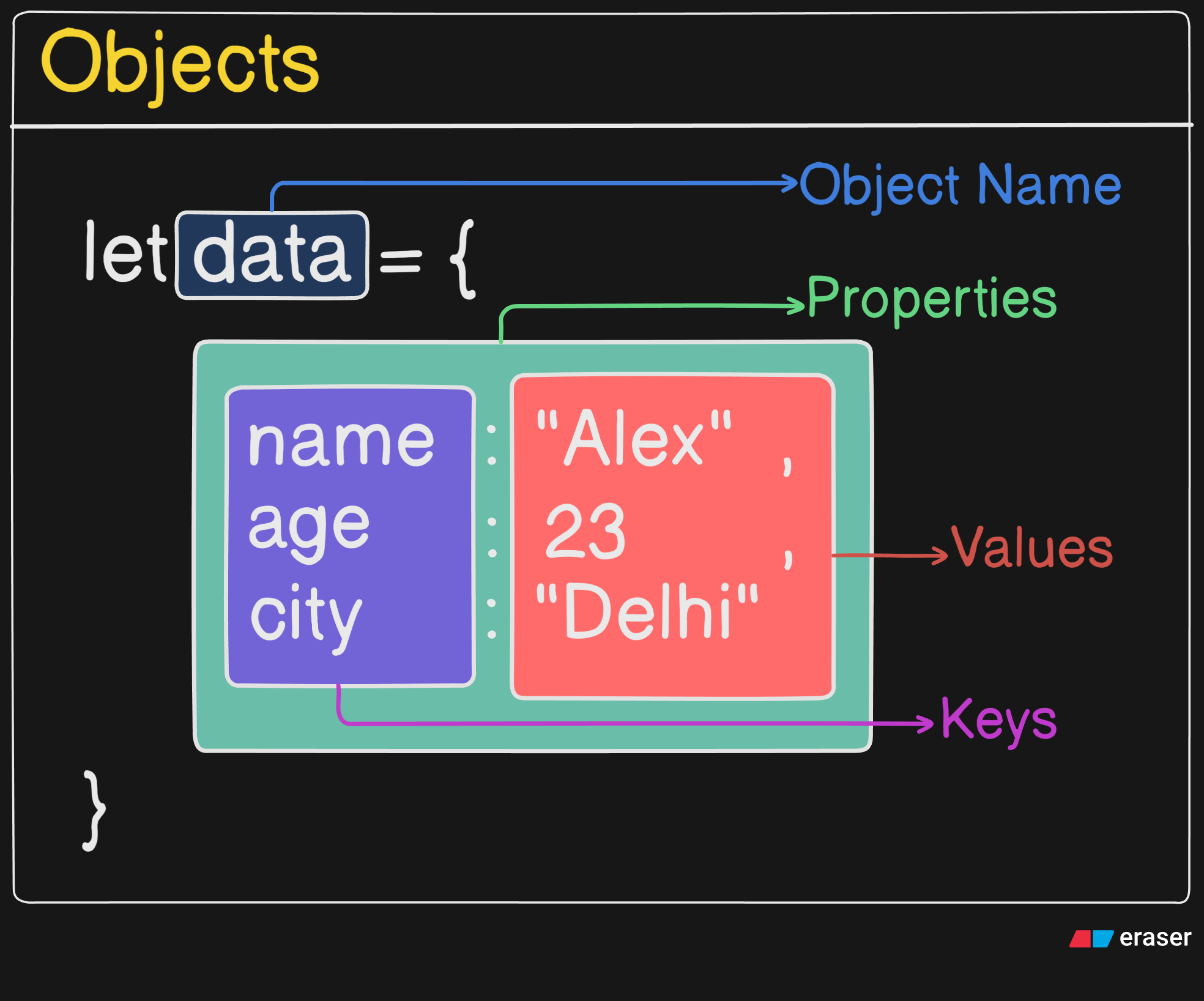
(I know the colors are a bit wacky but just bear with me😅.) Here name, age and city are called keys (or properties) and "Alex", 22 and "Delhi" are the values associated with them. The biggest advantage of objects is that they allow us to group related information together under one variable.
Array vs Object
Now since we have just learnt arrays in the previous article it is important to understand the difference between arrays and objects. Arrays store values in an ordered list and we access those values using indexes. Objects on the other hand store values using keys, which makes the stored information much more descriptive.
let numbers = [10,20,30];

console.log(numbers[0]);
// Output: 10
let person = {
    name: "Alex",
    age: 22,
    city: "Delhi"
};

console.log(person.name);
// Output: Alex
Notice how arrays use numbers (0, 1, 2 ...) and we use square bracket [] while accessing the values at those indices. While objects use property names such as name, age or city and we use . infront of the object name to access the value at the specific keys. Although we could use square brackets as well but it is done rarely in practical scenarios. When we are storing simple lists we use arrays, but when we are describing an entity we usually use objects.
Creating Objects
Creating an object in javascript is quite simple. We use curly braces {} and inside them we define properties in the format key : value. The following codeblock contains the syntax
// First Method:
const isroMission = {
    name: "Chandrayaan-3",
    launchYear: 2023,
    destination: "Mars",
    destination: "Moon",
    successful: true,
};

console.log(isroMission.name); // Output: Chandrayaan-3
console.log(isroMission["destination"]); // Output: Moon
// For duplicate keys the last set value is used.
const key = "launchYear";
console.log(isroMission[key]); // Output: 2023

// Second Method:
const isro = new Object();
isro.agency = "ISRO";
isro.headquarters = "Bengaluru";
isro.founded = 1969;

// Third Method:
const spaceAgency = {
    type: "Government Space Agency",
};

const isroAgency = Object.create(spaceAgency);
isroAgency.name = "ISRO";

console.log(isroAgency.type);
// Output: "Government Space Agency"
// This is the concept of inherited properties!

// Objects can also store functions, which are called "methods"!
const rover = {
    name: "Pragyan",
    explore() {
        return `${this.name} is exploring the Moon`;
    },
};

console.log(rover.explore());
Accessing Properties
Once the object is created we obviously need to access the data stored inside it. As mentioned earlier, there are two ways to do this in javascript.
Dot Notation
The most common method is dot notation where we simply write the object name followed by a dot and the property name.
let person = {
    name: "Alex",
    age: 22,
    city: "Delhi"
};

console.log(person.name);
console.log(person.age);
Bracket Notation
Another way is bracket notation where the property name is written inside square brackets as a string.
let person = {
    name: "Alex",
    age: 22,
    city: "Delhi"
};
let key = "name";
console.log(person["city"]);
console.log(person[key]);
// Bracket notation becomes useful when the property
// name is stored inside a variable.
Updating Object Properties
Objects in javascript are mutable which means the value of any property can be changed after the object is created. Updating a property is done simply by assigning a new value to it.
const nasaMission = {
    mission: "Artemis I",
    launchYear: 2022,
    destination: "Moon",
    crewed: false
};

// Normal update
nasaMission.launchYear = 2024;
// Bracket notation update
const key = "destination";
nasaMission[key] = "Mars";

// Updating a non-existing property
nasaMission.launchSite = "Kennedy Space Center";
// It doesn't throw an error but adds the
// key value pair to the object!

// Note: Property names with spaces must use bracket notation
nasaMission["mission status"] = "Planned";

// Nested object update
nasaMission.vehicle = {
    rocket: "SLS",
    capsule: "Orion"
};

nasaMission.vehicle.rocket = "Starship";

// Note: const objects can still have their properties changed
const curiosity = {
    rover: "Curiosity",
    planet: "Mars"
};

curiosity.planet = "Mars Surface"; // allowed!

// But reassigning the whole object would fail
console.log(nasaMission);
console.log(curiosity);
Adding and Deleting Properties
Adding and deleting properties is an essential functionality to know when handling objects. Although it is quite easy but has some edge-cases covered in the following codeblock:
const adityaMission = {
    name: "Aditya-L1",
    agency: "ISRO",
    launchYear: 2023
};

// Adding new properties
adityaMission.destination = "Sun";
adityaMission.orbit = "L1 Halo Orbit";
adityaMission.payloads = {
    VELC: "Visible Emission Line Coronagraph",
    SUIT: "Solar Ultraviolet Imaging Telescope"
};

console.log(adityaMission);
// Output:
// {
//   name: "Aditya-L1",
//   agency: "ISRO",
//   launchYear: 2023,
//   destination: "Sun",
//   orbit: "L1 Halo Orbit",
//   payloads: {
//     VELC: "Visible Emission Line Coronagraph",
//     SUIT: "Solar Ultraviolet Imaging Telescope"
//   }
// }

// Deleting a property
delete adityaMission.orbit;

// Deleting nested properties
delete adityaMission.payloads.SUIT;

console.log(adityaMission);
// Output:
// {
//   name: "Aditya-L1",
//   agency: "ISRO",
//   launchYear: 2023,
//   destination: "Sun",
//   payloads: {
//     VELC: "Visible Emission Line Coronagraph"
//   }
// }

// Note: deleting a non-existent property does nothing
delete adityaMission.nonExistingProp;

console.log(adityaMission);
// Output:
// {
//   name: "Aditya-L1",
//   agency: "ISRO",
//   launchYear: 2023,
//   destination: "Sun",
//   payloads: {
//     VELC: "Visible Emission Line Coronagraph"
//   }
// }
Looping through Object Keys
Just like arrays we can also iterate through objects. One common way to do this is using the for...in loop which goes through every property of the object. Usage is as follows:
const gaganyaan = {
    name: "Gaganyaan",
    agency: "ISRO",
    launchVehicle: "LVM3",
    destination: "Low Earth Orbit",
    crewCapacity: 3
};

for (let key in gaganyaan) {
    console.log(key, ":", gaganyaan[key]);
}

// Output:
// name : Gaganyaan
// agency : ISRO
// launchVehicle : LVM3
// destination : Low Earth Orbit
// crewCapacity : 3


// Quirk: inherited properties also appear in for...in loops

const humanSpaceflight = {
    missionType: "Human Spaceflight"
};

const mission = Object.create(humanSpaceflight);
mission.name = "Gaganyaan";
mission.launchYear = 2025;

for (let key in mission) {
    console.log(key, ":", mission[key]);
}

// Output:
// name : Gaganyaan
// launchYear : 2025
// missionType : Human Spaceflight
Conclusion
Now this concludes our introduction to objects in javascript. We understood what objects are and why they are needed, how they store information using key-value pairs and how they differ from arrays. We also learnt how to create objects, access their properties using dot notation and bracket notation, update values, add or delete properties and loop through all the keys of an object. Objects are used everywhere in javascript so having a clear understanding of them is quite important.
Thank You!


