The Node.js Event Loop Explained
In this article we are gonna study one of the most important concepts in Node.js which is the Event Loop. Now many of us initially hear this line JavaScript is single threaded and instantly get confused. Because at the exact same time they also see that many javascript programs handle multiple things at same time. So naturally one question appears:
"If JavaScript is single threaded, then how is all this asynchronous behavior even possible?"
"And if this is possible, is JavaScript single threaded?"
And that is exactly what the event loop helps solve. But before understanding the event loop itself, we first need to understand what Node.js actually is.
What the event loop is
Now many initially think the event loop is some magical hidden engine. But honestly the easiest way to think about it is:
"A task manager continuously checking completed async work."
That is the simplest correct mental model. Conceptually it behaves somewhat like:
while(true) {
    check completed tasks
    execute callbacks
}
Obviously internally Node.js is much more complex than this. But initially this mental model is enough. The event loop continuously checks:
Did some async work complete?
If yes:
Execute its callback
If not:
Continue checking other things
And this loop keeps running until nothing is left pending. But now the bigger question becomes:
"Why was this even needed in the first place?"
Why Node.js needs an event loop
To understand this, we first need to understand one very important thing: JavaScript is single threaded. Which means:
One main thread
        |
One thing executes at a time
Now suppose Node.js did NOT have an event loop. And suppose we did this:
readHugeFile();
Now imagine this file takes 5 seconds to read. If JavaScript directly waited for the file. Everything freezes, No API requests. No timers. No other users. No callbacks. Entire server blocked. Which honestly would be terrible. Because servers constantly handle Multiple users , Database queries , File systems , Authentication , APIs ,Background tasks... And much more (Yes! all true) So Node.js needed a system where slow tasks could happen separately while JavaScript continued running normally. And this is exactly where the event loop enters.
Understanding JavaScript vs Node.js
Now another important confusion many have initially is JavaScript != Node.js. JavaScript itself is just a programming language. It gives you things like:
Variables
Functions
Loops
Conditionals...
But things like:
setTimeout()
fetch()
fs.readFile()
are NOT originally part of JavaScript itself. These are provided by the environment. In browsers Browser provides APIs. In Node.js: Node.js provides APIs. And internally Node.js uses:
V8 Engine
C++ bindings
libuv
Now among these, libuv is extremely important for asynchronous behavior. Because libuv provides things like:
Event loop
Thread pool
Async I/O handling
And this is what allows Node.js to behave asynchronously while JavaScript itself still remains single threaded.
Task queue vs call stack (conceptual only)
Now before going deeper into the event loop, we first need to understand two very important concepts.
Call Stack
The call stack is where JavaScript executes functions. Suppose we do:
function mine() {
    console.log("Mining Diamonds");
}

mine();
Roughly the flow becomes:
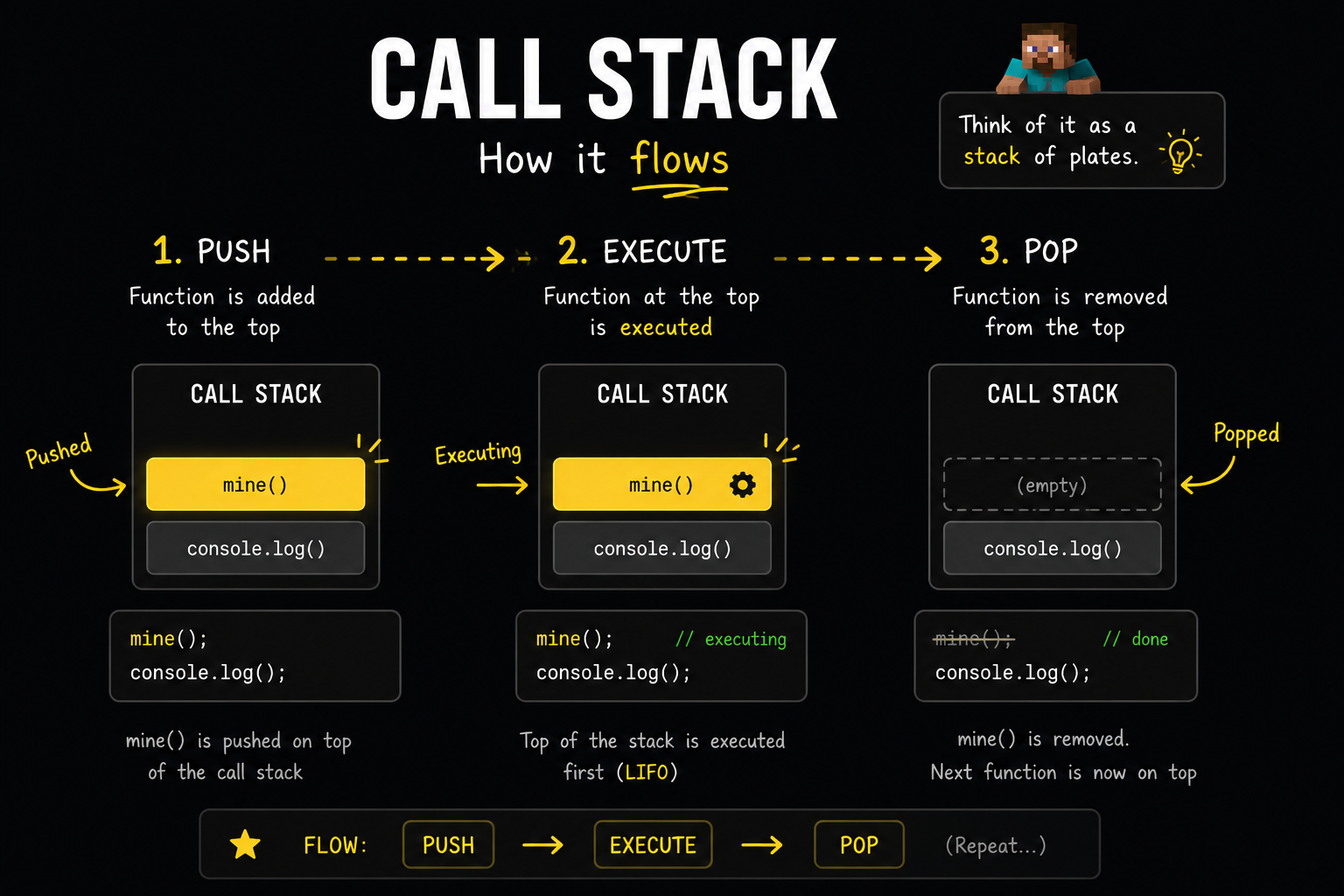
Functions keep entering the stack. Then after execution they leave the stack. This is where actual JavaScript execution happens.
Task Queue
Now another thing exists called the task queue. This queue stores completed async callbacks waiting to execute. For example:
setTimeout(() => {
    console.log("Creepr Spawned! Oh Mannn");
}, 0);
Now many initially think:
0ms = instant execution
But that is NOT what happens. Suppose we do:
console.log("Start");

setTimeout(() => {
    console.log("Timer");
}, 0);

console.log("End");
Output:
Start
End
Timer
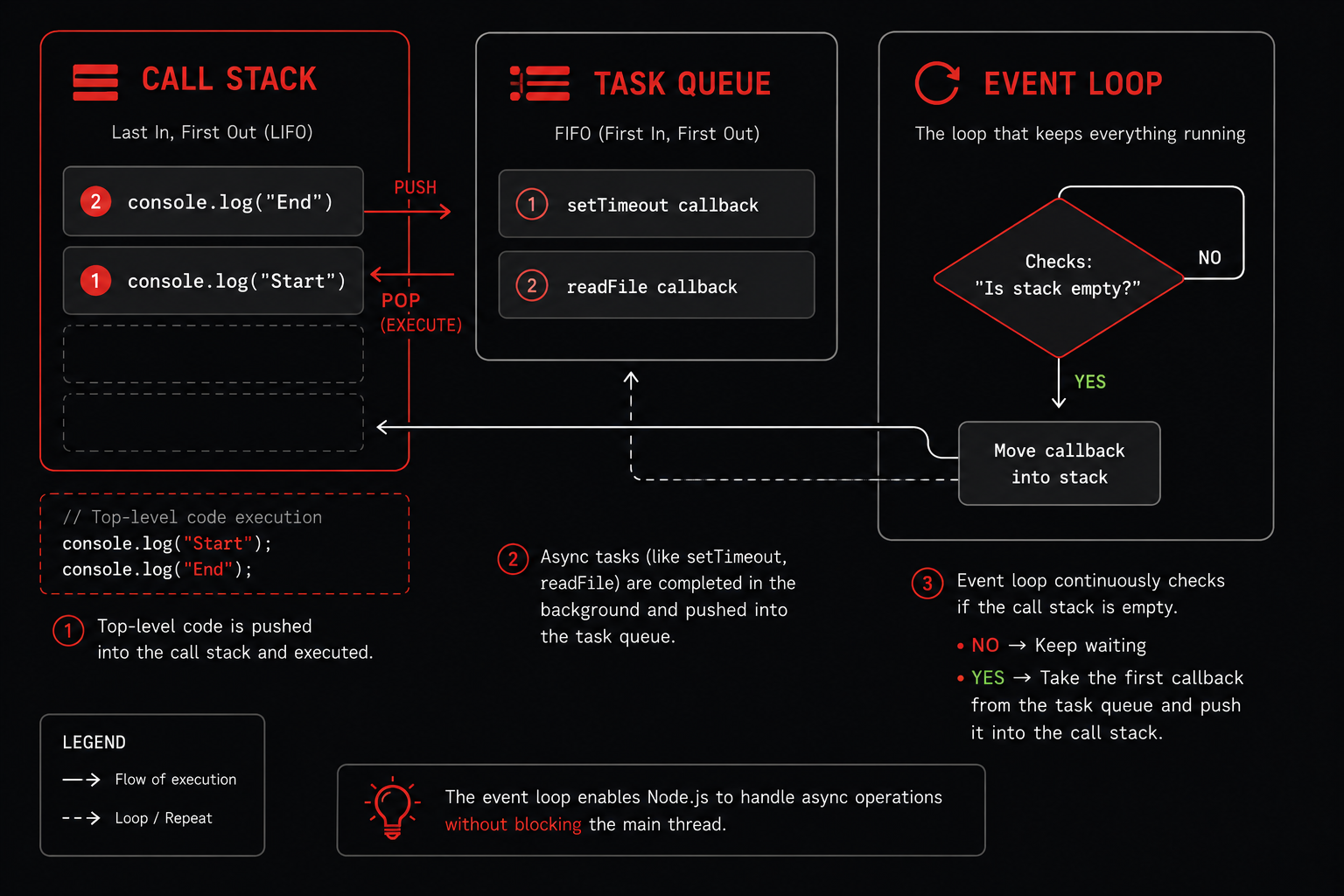
Now why did this happen? Because even though the timer completed quickly, its callback still waits inside the task queue. The event loop only moves it into the call stack once the stack becomes empty. Conceptually:
CALL STACK            TASK QUEUE

console.log()         setTimeout callback
console.log()
Once the stack becomes empty:
Event Loop
     |
Moves callback into stack
Then the callback finally executes. And this mental model is extremely important.
How async operations are handled
Now this is where things start becoming interesting. Suppose we do:
const fs = require("fs");

fs.readFile("diamond.txt", "utf-8", (err, data) => {
    console.log("File Read Complete");
});

console.log("Mining...");
Output:
Mining...
File Read Complete
Now many at strt think JavaScript itself is reading the file. But that is NOT what happens. What actually happens is roughly this:
JavaScript
     |
Registers async task
     |
Node.js/libuv handles work
     |
Callback returns later
And while the file is being read:
console.log("Mining...");
can execute immediately. This is one of the biggest reasons Node.js feels non-blocking. Because the main JavaScript thread is NOT sitting idle waiting for the file. Instead:
Task gets delegated
Background system handles it
Event loop keeps checking completion
Callback enters queue once ready
Callback finally executes
This architecture is extremely important.
Event loop execution flow
Now let us understand the overall execution flow more clearly. Suppose this is our code:
console.log("Hello");

setTimeout(() => {
    console.log("Timer Callback");
}, 0);

console.log("End");
Although if we read this line by line and think, this is the output we expect:
Hello
Timer Callback
End
But Node.js does NOT execute async callbacks immediately. The actual flow is closer to this:
Step 1 — Environment initializes
Node.js first initializes its environment internally. Things like Global objects, Runtime setup, Internal variable, APIs; all get prepared.
Step 2 — Top level code executes
Then synchronous top level code starts executing. So first:
console.log("Hello")
runs immediately. Output:
Hello
Step 3 — Async callbacks register
Now this line:
setTimeout(...)
does NOT execute its callback immediately. Instead:
Timer gets registered
Meaning Node.js now knows:
"Run this callback later"
Step 4 — Remaining synchronous code executes
Then:
console.log("End")
executes. Output becomes:
Hello
End
Step 5 — Event loop checks completed tasks
Now the call stack becomes empty. The event loop checks: Did timer complete? If yes: Move callback into queue. Then: Push callback into call stack. Then finally: Timer Callback gets printed. So overall output becomes:
Hello
End
Timer Callback
Timers vs I/O callbacks (high level)
Now another interesting thing appears with timers and file operations. Suppose we do:
setTimeout(() => {
    console.log("Timer Finished");
}, 0);

fs.readFile("diamond.txt", () => {
    console.log("File Finished");
});
Now many try predicting which one executes first. But internally Node.js handles these inside different event loop phases. At a very high level:
Timers
   |
I/O callbacks
   |
Other checks
Now we are intentionally avoiding very deep phase internals in this article. But this is enough to understand one important thing:
setTimeout(fn, 0)
does NOT mean:
Execute instantly
It mainly means:
Execute AFTER minimum delay
And only once:
The delay completed
Stack became empty
Event loop reached correct phase
can the callback actually execute. This distinction is extremely important.
Understanding the queue analogy
One of the easiest ways to visualize the event loop is using a queue analogy. Suppose callbacks are standing in a line. Like this:
Timer Callback
File Callback
Database Callback
Now the event loop behaves somewhat like:
"Okay who completed first?"
Whoever completed first enters the queue first. And because queues work on:
FIFO
First In First Out
callbacks generally execute in queue order. Which is why something like:
setTimeout(() => {
    console.log("First");
}, 0);

setTimeout(() => {
    console.log("Second");
}, 0);

setTimeout(() => {
    console.log("Third");
}, 0);
usually gives:
First
Second
Third
because callbacks entered the queue in that order.
Role of event loop in scalability
Now honestly this is one of the biggest reasons Node.js became extremely popular. Imagine two servers.
Blocking Server
User 1 Request
      |
Wait for DB
      |
Everything blocked
Now every other user waits. Terrible scalability.
Event Loop Based Server
User 1 DB Request
        |
Delegate async task
        |
Continue serving others
Now while one user waits for:
Database
File system
API response
Authentication
Node.js can continue serving completely different users. And this is one of the core reasons Node.js performs extremely well for:
APIs
Realtime systems
Chat applications
Streaming
Web servers
Socket based applications
The event loop is one of the biggest reasons behind this scalability.
Event loop execution cycle visualization
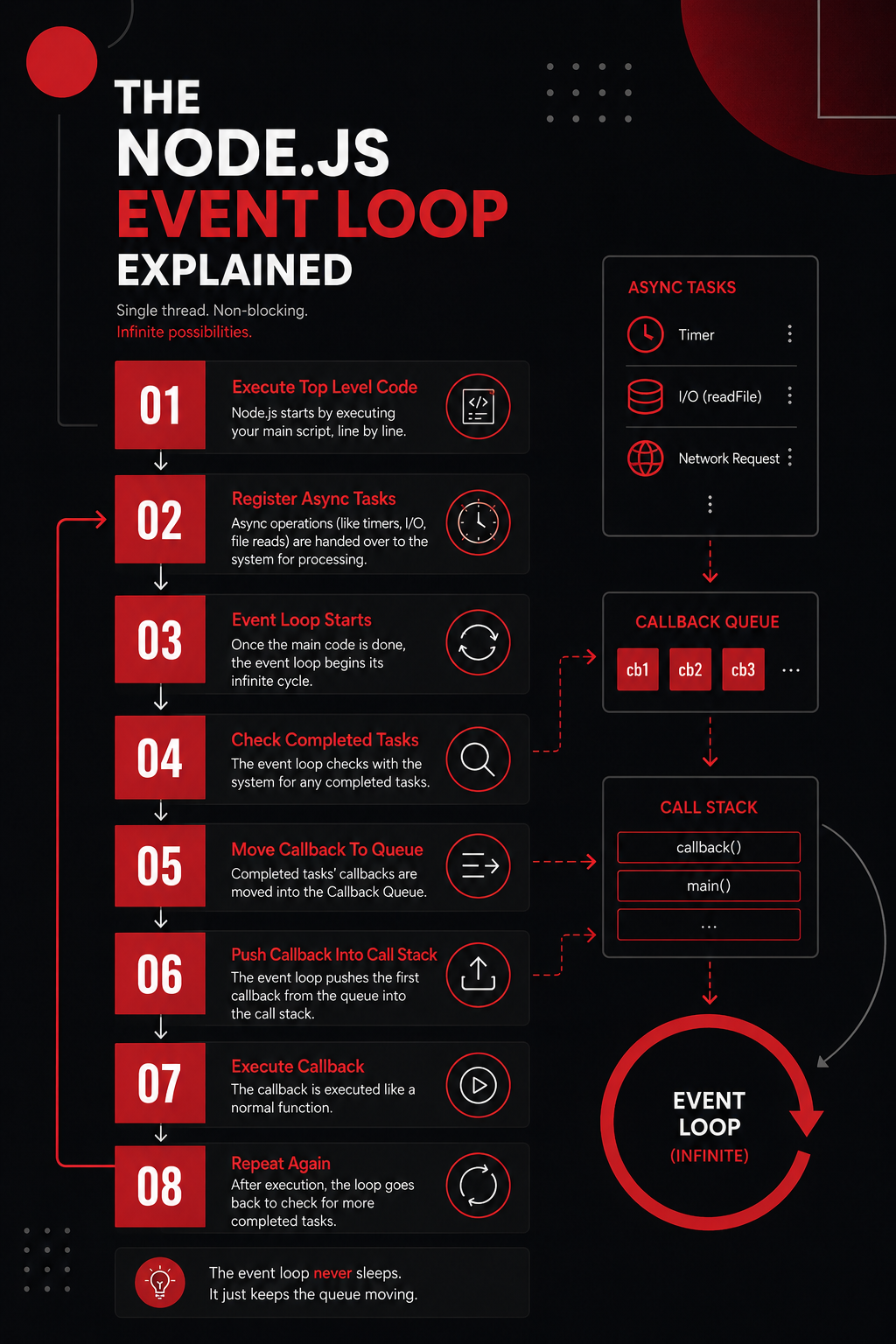
Call stack + task queue + event loop flow
Conclusion
With this we now understand what the Node.js event loop actually is and why it became necessary for asynchronous JavaScript execution. We saw how JavaScript still remains single threaded while Node.js handles asynchronous operations efficiently, how the call stack and task queue work together, how async operations get delegated, how timers differ from I/O callbacks, and why the event loop plays such a huge role in Node.js scalability.
Although the event loop may initially feel magical, internally it mainly behaves like a task manager continuously checking completed asynchronous work and scheduling callbacks for execution.
I hope you enjoyed it!
Thank You.


