JavaScript Arrays 101
So in the series of learning javascript we have yet talked about primitive data types but we have not learnt about non primitive data types. In this article we would discuss possibly the most used data structure in programming. Be it web development or competitive programming or any other correlate programming field, arrays are used everywhere!
What are Arrays and why do we need them?
Let's start with a example project, that every developer experiences atleast once "Todo Application". Now if you were to design a Todo application in javascript how would you do so?
One answer could be that we could store each todo in separate variables, and for each todo maintain another variable which checks if the todo is accomplished or not. But is that efficient? even if leave the aspect of efficiency, would the code be readable? As realistically how many variables could we possibly create, even if alot there would still be an upper bound.
Thus comes the concept of Arrays, Arrays are a non primitive data structure which stores data in the form of a list of values. In javascript arrays are dynamic i.e. that they don't have any pre-defined limiting length or a limiting data type. You could visualise them like:
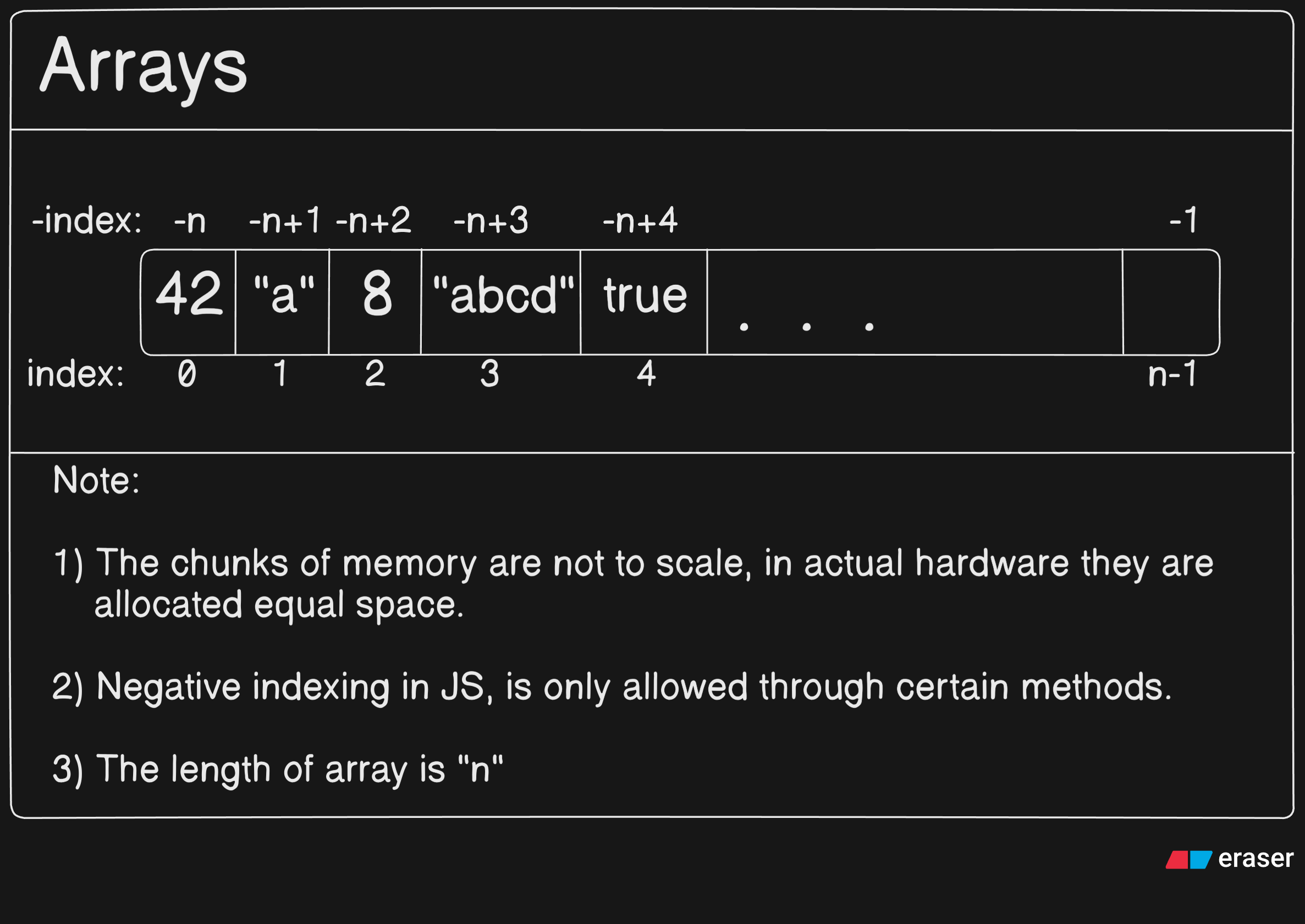
Now there are some terms like indexing, memory chunks which you may not be aware of and which is totally fine as we are gonna cover them in this article,
Indexing: In arrays each value is assigned an index so we can easily access them using the index as the key. In javascript, most programming languages indexing starts from
0tilln-1wherenis the total number of elements in the array.Memory Chunks: Javascript tries to store elements of array in contingent memory locations in the hardware, for easier access and efficient memory management.
How to create an array
Now we conceptually know what is an array, but what is the syntax? Well let's procede on to understanding it's syntax and some frequently occuring usages:
// Methods to create an array!

let firstMethod = [1,2,true,"false",102n];
// This directly creates an array with the given values.

let secondMethod = Array(10);
// The Array constructor creates an array of the given length
// but with empty values, such as:
console.log(secondMethod); // Output: [ <10 empty items> ]

let thirdMethod = Array(10).fill(0);
// Same as the second method but fills the array
// with 0's instead of <empty items>

let fourthMethod = Array("abcd");
console.log(fourthMethod); // Output: ['abcd']
// Possible: Array("abcd","efgh"...) == ['abcd', 'efgh' ...]

let fifthMethod = Array.of(10);
console.log(fifthMethod); // Output: [10]
// Unlike Array(10), this creates an array containing the value.

let sixthMethod = Array.from("abcd");
console.log(sixthMethod); // Output: ['a', 'b', 'c', 'd']
// Notice how it differs from Array("abcd")!

let seventhMethod = Array.from({ length: 5 }, (_, i) => i); console.log(seventhMethod); // Output: [0,1,2,3,4]
Accessing elements using index
We now know how to initalise and store some data in them. But in the end if we can't access it, it is just occupying memory. So we know learn how to access elements through indices [indexing].
let exampleArray = ["one", "two", "three", true, 49583, 10n];

console.log(`First element: ${exampleArray[0]}`);
// Output: First element: one

console.log(`Third element: ${exampleArray[2]}`);
// Output: Third element: three

console.log(`Last element: ${exampleArray[exampleArray.length - 1]}`);
// Output: Last element: 10n
Now as said in the diagram previously we cannot directly use negative indexing, so we use a method of array, .at(pos), which just returns what is at the a particular index of an array. Now even if you haven't used array methods before rest easy, this is quite a simple one although the discussion of more complex ones is in an upcoming article!
let exampleArray = ["one", "two", "three", true, 49583, 10n];

// Accessing last element using negative indexing with .at()
console.log(exampleArray.at(-1));
// Output: 10n

// Second last element
console.log(exampleArray.at(2));
// Output: three
Updating elements
Accessing elements is useful but most when practically code we would need to update the values stored in the array. Thankfully arrays in javascript are mutable which means that the value at each index of an array can be modified. The code for it is as follows:
let grades = ["A", "B", "C"];

grades[0] = "A+";
grades[1] = "A";
grades[2] = "B";
console.log(grades);
// Output: ['A+', 'A', 'B']

// But what if the index is out of range?
grades[3] = "C";
console.log(grades);
// Output: ['A+', 'A', 'B', 'C']
grades[8] = "F";
console.log(grades);
// Output: ['A+', 'A', 'B', 'C', <4 empty items>, 'F' ]
Array length property
This is an easy one, we know every object can store some properties and methods inside it. And internally arrays are also an object, so one of the property it stores is called length. Which as the name suggests stores the array's length. This is one of the most frequently used property of arrays the usage is as follows:
let anArray = ["apple", "orange", "kiwi", "guava"]
let anotherArray = Array(10);

// As it is a property we don't use parenthesis, ()
console.log(anArray.length); // Output: 4
console.log(anotherArray.length); // Output: 10
console.log(Array.from("hello").length); // Output: 5
Basic looping over Arrays
Now that we know some basic property of arrays, it's important to learn how to traverse an array. Traversing an array just means going through each element of an array once, be it printing the elements one by one or modifying the values one by one. The code for it is as follows:
let list = ["1", "two". "3", "four", "5", "six"];

for (let i = 0; i < list.length; i++) {
    console.log(list[i]);
}
for (const element of list) {
    console.log(element);
}
// Output for both:
// 1
// two
// 3
// four
// 5
// six
Conclusion
With this we come to the end of this article on arrays. We understood what arrays are, why they are needed in programming. We also looked at how arrays can be created in javascript, how we can access elements using indexing, update values, check the length of an array and iterate through it using loops. Having a clear understanding of arrays makes writing and reasoning about code much easier. There are many more powerful array features and built-in methods which we will explore in upcoming articles. I hope you liked it.
Thank You!


